Docker Build Cache on a Homelab: 152 GB Used, 17.7 GB Safely Freed
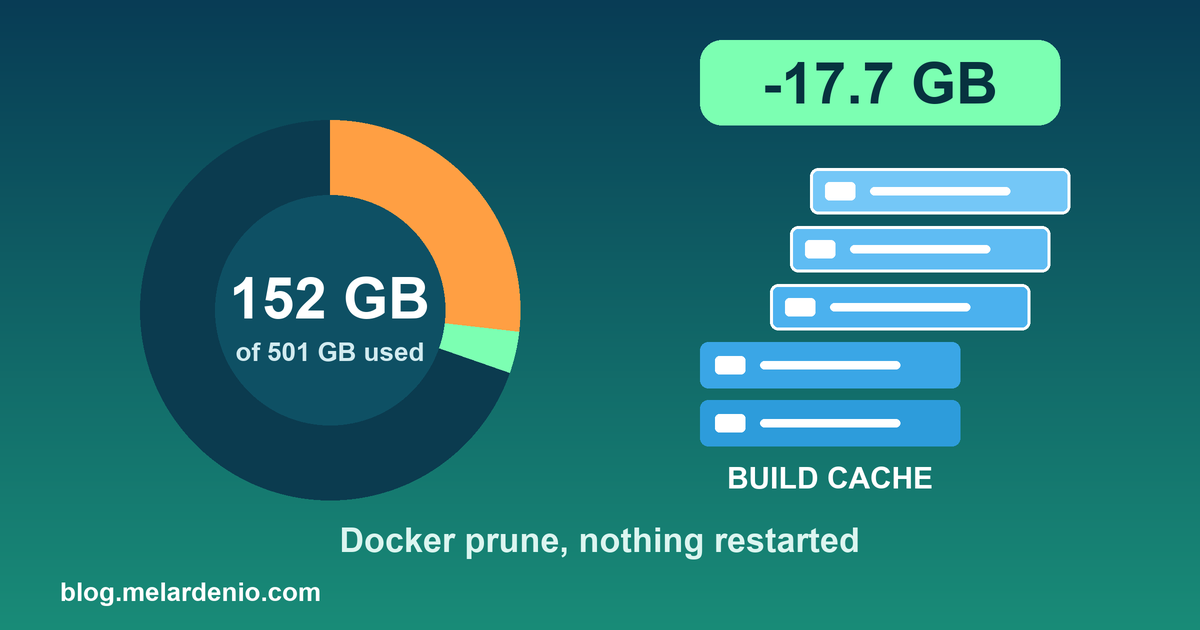
My homelab server was at 152 GB used out of 501 GB. That's only 32 percent, so it wasn't an emergency, but I had no idea where the space went, and I'm wary of deleting anything on a box that runs real apps. Here is what I found and the one cleanup I was comfortable running.
Where the space was
Almost everything on the server is Docker. /var/lib/docker is root-only, so du can't measure it. docker system df can, and it showed roughly:
- Images: about 71 GB. This figure is overstated, because images share layers.
- Build cache: about 38 GB.
- Volumes: about 17 GB.
The rest was ordinary clutter: roughly 24 GB in my home folder (7.8 GB of npm cache, 5.5 GB of VS Code server files), about 12 GB under /opt (5.3 GB of old release folders), and about 4 GB of system journal logs.
What I did not touch
I treat three things as off limits when cleaning a server that runs production apps:
- Volumes. That's where the databases live. I never run
docker system prune --volumes. - Tagged or unused images. One of them may be the rollback target if a release goes wrong.
- Old release folders. Same reason.
I also made sure no build or deploy was running before pruning anything, because a prune during a build can break it.
The safe win: old build cache
Build cache is the one thing Docker rebuilds on its own. Nothing running depends on it, and the only cost of deleting it is that the next build is slower. I removed everything older than seven days:
docker builder prune -f --filter until=168h
Before: 152 GB used, 328 GB free. After: 136 GB used, 345 GB free, which is 29 percent. That freed 17.7 GB, and I kept the 14 GB of recent cache so the next deploy would still build quickly.
Checking nothing broke
After the prune I counted the running containers again. It was 23 before and 23 after, and none showed a status other than Up. Nothing needed a restart.
What's left if I need more
About 14 GB of unused images, 7.8 GB of npm cache, and about 3 GB of journal logs. I left all of those alone for now. The images are a rollback risk, and clearing the journal needs sudo and costs me old log history.
Where it stands two days later
I ran the same numbers again on October 13, two days after the prune.
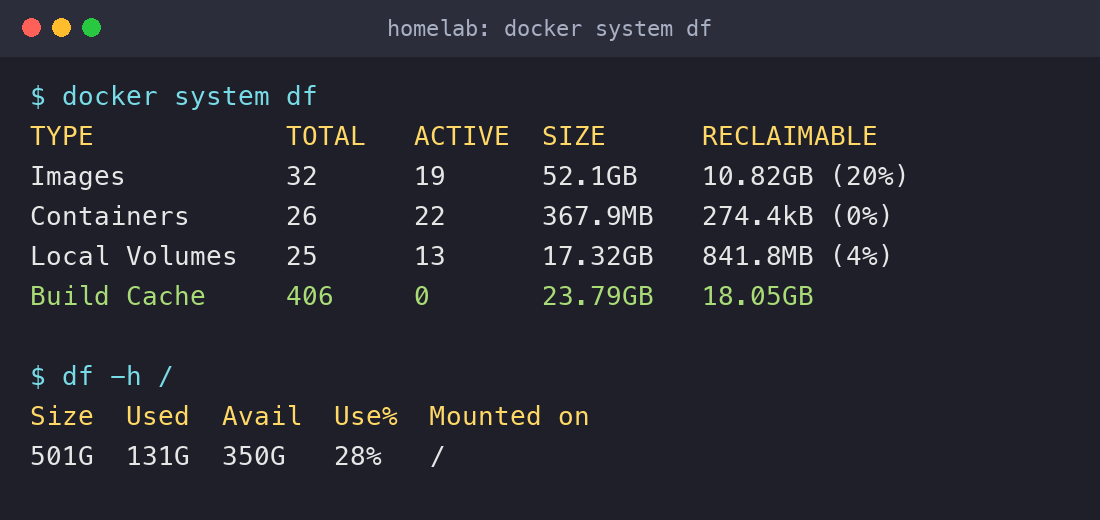
Disk used is 131 GB, 28 percent, with 350 GB free. The line to look at is build cache: 406 entries, 23.79 GB, with 18.05 GB reclaimable. I kept 14 GB of recent cache on the 11th, so roughly 10 GB of new cache piled up in two days of normal use. I did not track what else changed on the disk in between, so I won't claim the rest.
The lesson is that build cache refills itself. Pruning it is maintenance, not a one-time fix, and you want to know how fast yours grows before you decide how often to clear it.
How to read docker system df
- ACTIVE is what a running container is using. Build cache with an ACTIVE count of 0 means nothing running depends on it right now.
- RECLAIMABLE is what Docker thinks it can delete without breaking something running. For images, that means unused ones, which may include a rollback target.
- The totals overlap, because images share layers, so the rows don't add up to what is on disk.
Why I prune by age and not everything
docker builder prune -f --filter until=168h removes cache older than seven days. Leaving off the filter clears all of it, and your next build starts cold. Keeping the recent layers means the next deploy still reuses what it is likely to need.
I avoid docker system prune -a on a production host. It also deletes every image not used by a running container, including tagged images you may need to roll back a bad release. The --volumes flag is worse. It deletes unused volumes, and volumes are where databases live. Look at the volumes row above: 25 volumes, 13 active. Those other 12 may be old data or the database of a stopped service. I would not delete any of them without knowing what each one is.
What I check before running it on a server
- Nothing is building or deploying right now, because a prune in the middle of a build can break it.
- Record
df -h /anddocker system dfas the "before". - Run the one approved prune and nothing else.
- Record the "after", and count the running containers before and after. Today that count is 22. If it changes, something was affected.